


7/31/26
Disabling rules you do not wish to use
Several of the exercises in the book consist of proving a rule using only other rules. Steven Stegeman in his book proves each of the individual rules of inference from the others so, for example, he derives Modus Ponens P, P ⊃ Q ∴ Q from the other rules (i.e. he writes P, P ⊃ Q as premises and Q as the conclusion and derives the conclusion from the premises, but without using the rule of MP). He does this for all his rules. No doubt some Users will want to do the same. Of course, they can do this already on an 'honor system', by just avoiding any rule they are not supposed to use. But the software does provide support. The software can disable any menu item the User does not want to use, for example, MP. If a proof is 'started' from an empty selection, the proof panel is clear but the Menu bar is available and in particular the Rules menu is there and will open. It will look like this:
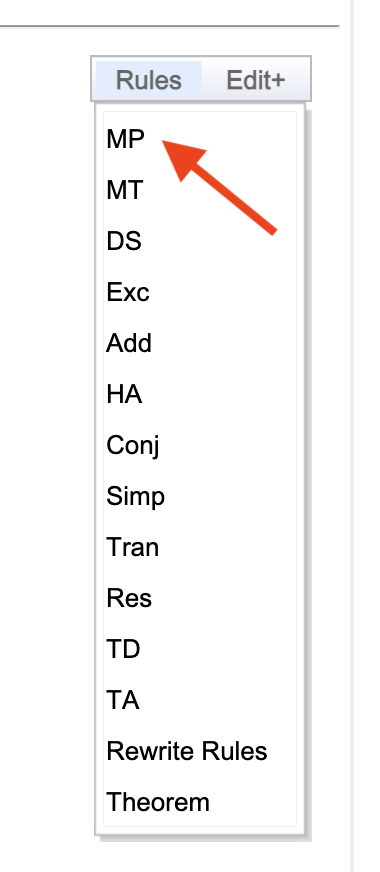
Mouse clicks on any Rules menu item toggles it on and off. A single mouse click on MP, for example, will disable it and the entire menu will look like this:
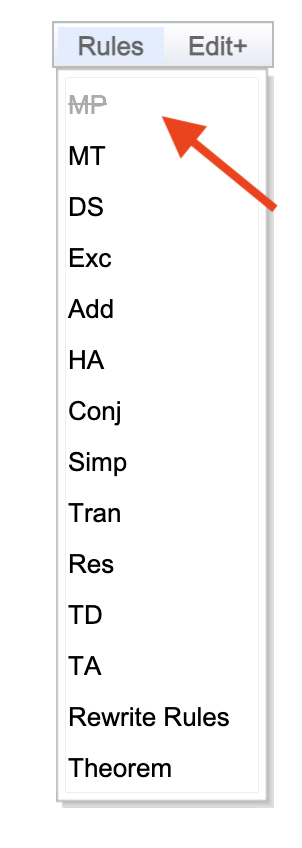
Once a real derivation is started, and the proof panel has contents, the configuration remains frozen. Then, clearing the proof panel allows further changes to the configuration (back to default or whatever is desired). Of course, if, for example, the Rules Menu item for MP is disabled, the User has no way of using MP in a derivation. [There is a footnote at the bottom on this general task and area.]
Footnote: Deriving individual rules from the others (without using Conditional Proof or similar methods)
Claude and I have written several theorem provers to do this automatically but an issue has come up. A parable might help to explain it. Supposedly you can pen a chicken in a U-shaped fence (with the food on the outside of the apex) because the chicken will not go backwards to go forwards. It will not go further away from the food or target to get closer to it. Similarly when climbing a hill, sometimes going backwards from a local peak is needed to go forward to the real summit. With the difficult cases of proving one rule from the others and with any reasonable measure of how far you are from succeeding — you have to go further from success (go backwards) in order to go forwards to success. So, if you can do that by yourself, by hand, all power to you! You are smarter than a chicken, smarter than me (but, sorry, we are not going to say you are smarter than Claude).